New Guide The Help Desk AI Maturity Journey: A Support Team’s Guide Download Now

The future of On-Premise

Introducing the On-Premise Controller

Deskpro Horizon brings the latest in On-Premise innovation with the On-Premise Controller. We can't wait for you to access the new On-Premise management tool and experience stress-free server administration.

Deskpro Horizon

Get to know the new Deskpro platform

Our On-Premise platform has been re-imagined alongside Deskpro's product interface, providing a flexible and painless solution for help desk management that never compromises on power.

On-Premise Controller

Take a tour of the On-Premise Controller

Familiarize yourself with our brand new server management platform that's revolutionizing On-Premise deployments.

Why should you upgrade?

Deploy Horizon to access new features

The version of our software you are likely on if you want to upgrade to Horizon is Deskpro Legacy.

Legacy is no longer under active development. It will continue to receive essential security patches for future updates, but to get access to the newest features and improvements, you must deploy Deskpro Horizon.

New Features

Features available only when you upgrade to Deskpro Horizon

To access the newest Deskpro features, you need to upgrade from your legacy help desk to Deskpro Horizon. Unlock the latest features for your team and gain the exciting features we add as part of our weekly releases.

Automated Backups

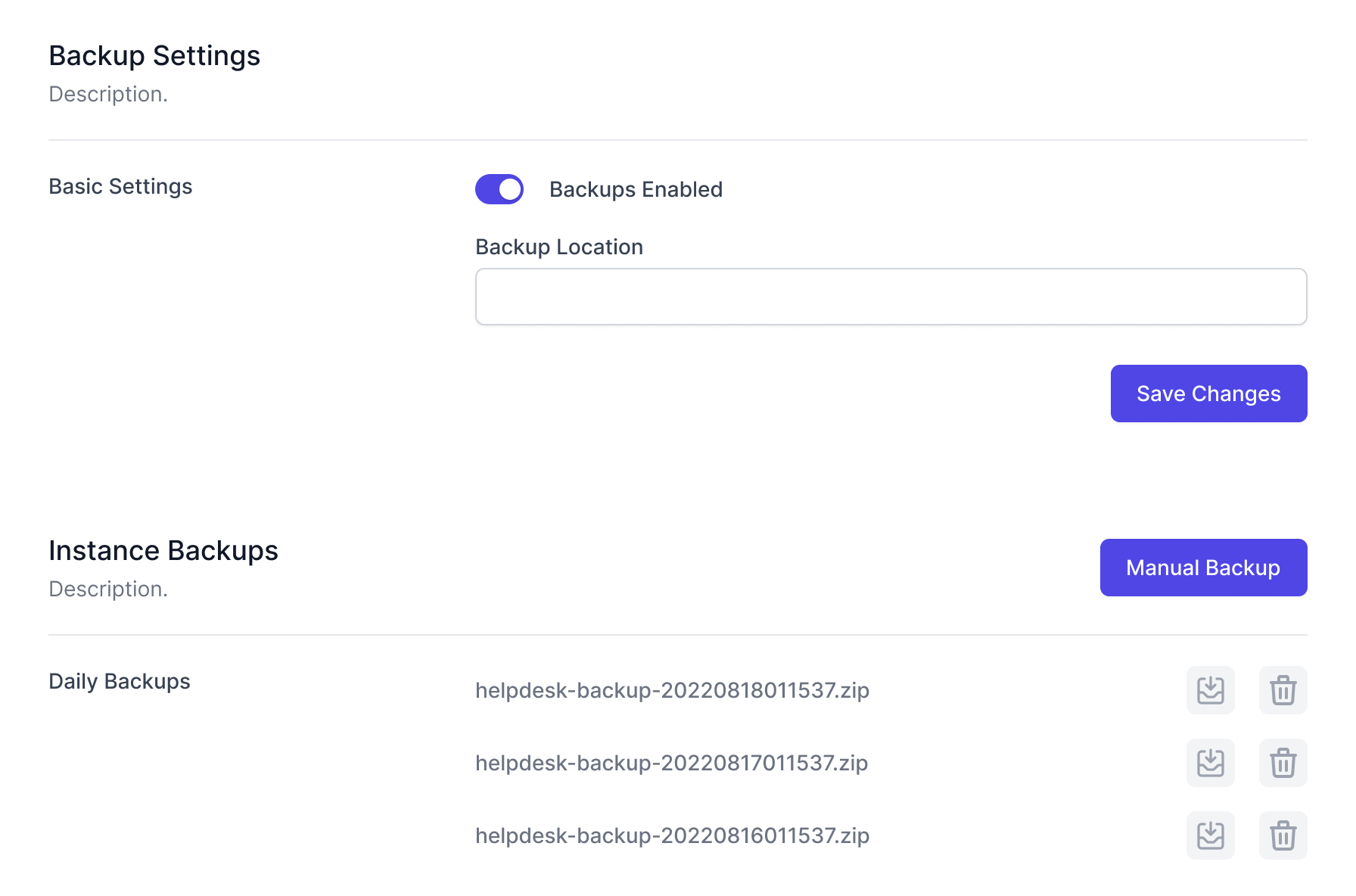
Daily automatic backups let you restore your help desk to working order in the event of any issues.

Multi-Instance Deployment

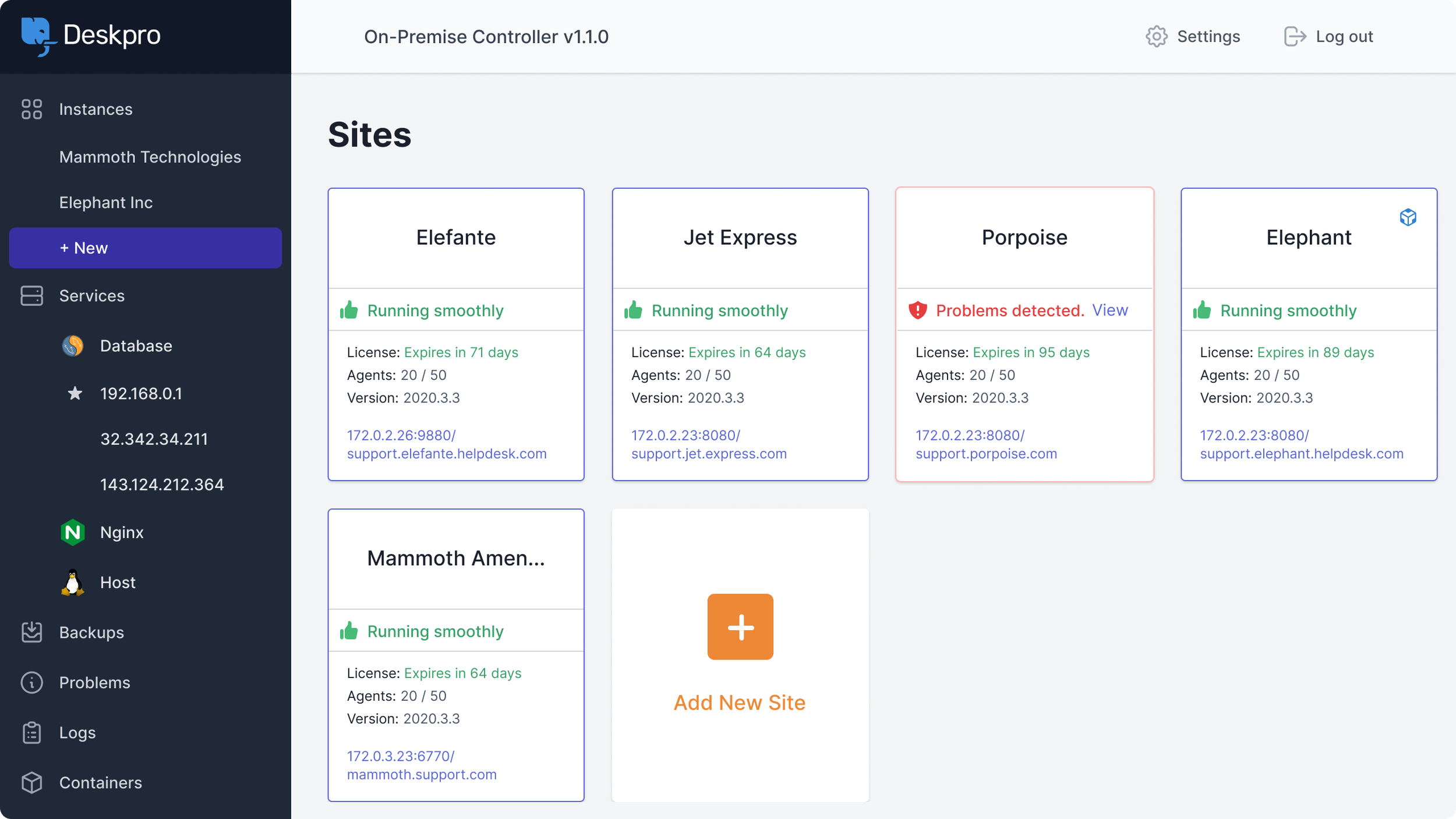
You can easily manage all of your instances through one clear interface in the controller.

In-Product Notifications

We have added notifications in Deskpro to alert you to any problems with your deployment.

Server Monitoring

The OPC monitors your instances and will send email alerts if any problems are identified.

New Features

New features being developed for Deskpro On-Premise will only be available from Horizon.

Stay Updated

Horizon includes latest versions of PHP, ElasticSearch, and MySQL, which will be upgraded for you.

Easy to Customize

On-Premise is still as customizable as ever, but our new UI makes it even easier.

Security Improvements

We automatically install security updates and enforce HTTPS to keep your help desk secure.

One-Click Upgrades

Upgrade your instances in one click from the OPC, reducing the manual effort of updates.

SSL Generation

Generate an SSL Certificate with one click or bring your own certificate.

Useful Logs

All your logs are easy to find in our intuitive interface, making it simple to manage log rotation.

Control File Storage

Choose your file storage option, from filesystem options to S3-compatible APIs.

Simple Set Up

Deploy your help desk in minutes

We have made it simple to deploy your help desk from the OPC, you can spin up instances in minutes and get your help desk running.

One-Click Importer
Five Minute Install

One-Click Importer

One-Click Importer

You can easily import previous versions of Deskpro into the On-Premise Controller with our one-click importer.

Five Minute Install

Five Minute Install

You can get your help desk installed and set up on Virtual Machines, Shell deployment, Bare Metal or Cloud Images in 5 minutes.
The On-Premise Controller

Manage an On-Premise instance as easily as SaaS

The On-Premise Controller, or OPC, is our new method for deploying and managing Deskpro On-Premise. It provides an alternative management system for On-Premise deployments.

manage-an-on-premise-instance-as-easily-as-saas
You're in control

Take control of On-Premise Management

You choose how your On-Premise instance is managed and who has access to the On-Premise Controller.

Manage it your way
Control access to the OPC

Manage it your way

Manage it your way

While the OPC provides a simple GUI to manage On-Premise deployments, you can still use shell scripts for all commands.

Control access to the OPC

Control access to the OPC

Set up permissions to dictate who can access the OPC and manage your instances.
Automate routine tasks

Make management more efficient

We created simple automations for routine tasks to minimize repetitive administrative processes.

Automated Backups
Notifications
Server Monitoring

Automated Backups

Automated Backups

Schedule automatic daily backups, so you can restore your help desk to a working state to get you back up and running should you ever need.

Notifications

Notifications

The OPC button in the help desk lets you jump to the On-Premise Controller, and the icon changes color to alert you of any issues.

Server Monitoring

Server Monitoring

The OPC will monitor services to ensure things are running smoothly and can send email alerts if any problems are detected.

Take a test run

Import a test instance to trial the new UI

Once you've installed the OPC, you can manage all upgrades from there, so you won't have to worry about deploying another version of Deskpro.

Take a test run

Import a test instance while still running your legacy help desk to test the UI and importing process.

An easy upgrade process

Once you have deployed Horizon, the upgrade processes via the OPC are very simple to manage.

In-Product Notifications

We have added notifications in Deskpro to alert you to any problems with your deployment.

Are you ready to upgrade to Deskpro Horizon?

Get started with deploying Deskpro Horizon for your On-Premise account today.