
Brand your widget
Align the widget with your brand using logos and colors.
New Guide The Help Desk AI Maturity Journey: A Support Team’s Guide Download Now
Revolutionize conversation with an integrated chat system.
Improve accessibility, streamline communication, and personalize the customer experience with Deskpro's Messenger widget.
Seamless Support, Always Available
Messenger puts live chat just a click away, no matter where your customers are on your website. This means they can get help when needed, without searching for a separate support channel or leaving your site.
One-click access to your Help Center
Plus, customers can access help content directly from Messenger, making it easier to find answers and resolve issues quickly.
Help Center
Embed your messenger widget onto any page across your site; enabling customers to access the Help Center from any page it's embedded on.
Customers using the widget can access all of your knowledge base content through the widget. Encouraging self-service through ticket deflection can reduce the strain on your agents and can increase the efficacy of your support platform.
make it your own
Customize Messenger to fit your brand; adding a unique touch to your support service.
With Messenger available on your website, Help Center, and in-product you can ensure your users have more consistent brand and customer experiences.
Align the widget with your brand using logos and colors.
Include avatars of your agents to humanize the conversation.
Collect user information before a chat and route them accordingly with chat flows.
Choose if it appears as a pop up or a closed feature on the landing page.
Help agents work proactively to resolve issues for your customers. Preview messages to quickly gather customer information so agents can work on putting things right before the customer can even say 'ticket'.
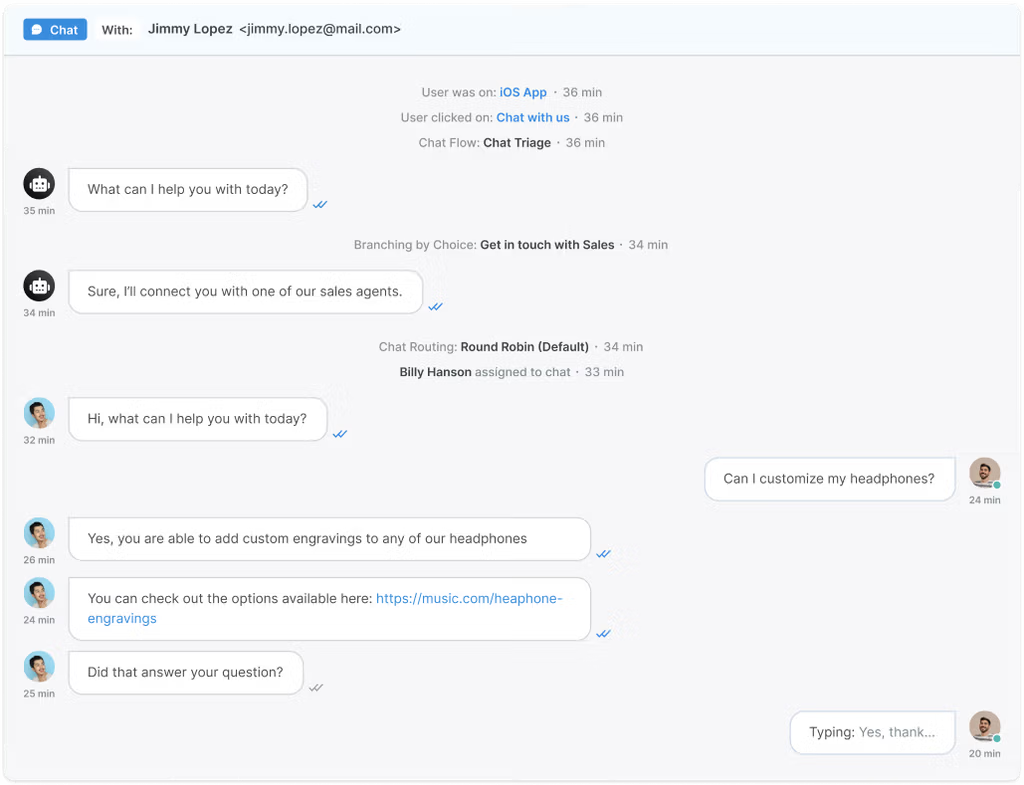
See messages as they're typed so you can start working on solutions before the user hits send.
Agents can add each other into live chats so that other agents can help them resolve issues.
When a customer is logged in agents can view their profile and ticketing history.
Agents are able to quickly direct customers to content or downloads with attachments.
Automations
Keep up with instant messenger chats by using snippets to insert a canned message which auto-fills customer information.
Missed chat tickets ensure agents are able to get back to a customer as soon as possible.
Choose how to assign agents to chat notifications; an optional round robin, forced round robin or just on a volunteer basis.
Customer Interface
Customers can fill in personal details and query topics to ensure they are assigned to the correct agent or department.
Customers can leave feedback at the end of their chat with an agent; helping you understand what your organization is doing well and what can be improved.
Your chat widget will automatically send a transcript of the conversation to the customer so they can always see the chat history.
Permissions
Control who can access chat through usergroup permissions. This can be limited to customers who are logged in or customers from a particular organization.
Create agent chat permissions so only specific departments or groups of agents can receive incoming chats.
Deskpro allows complete customization of the Chat Widget, including logos, colors, and avatars, ensuring it aligns with your brand's identity.
Yes, Deskpro provides reporting and analytics features that allow you to measure chat metrics, monitor agent performance, and gain insights for continuous improvement.
Absolutely. Deskpro offers seamless integration capabilities, allowing you to connect the messenger widget with your help center or ticketing system for a unified customer support experience.